
Best practices for optimizing AI credit spend through agent design and context framing

Most teams set up their first AI agent the same way: point it at a folder, connect a few tools, and ask questions. It works on a demo. Then the archive grows, more projects and people join, and the symptoms appear: answers get slower, the bill goes up, and the agent starts making things up.
The model is rarely the problem. The setup is. How you design agents and frame their context decides what every request costs and how good the answer is. Below are five practices that make the difference, and how GlobalContext builds them in so you don’t have to engineer them yourself.
Know what the model actually sees
A language model is stateless. It does not remember your project, your files or yesterday’s conversation. On every call, the agent packages instructions, data, tool definitions and your question into one context window (the text the model reads) and sends it over an API. The model sees only that window, and you pay for what goes into it.
When the agent is set up by pointing at a folder, that window gets stuffed with everything: archive chunks, every tool definition, project details hardcoded into the instructions, old messages, duplicates. The one part that mattered, your question, is a small slice of it.
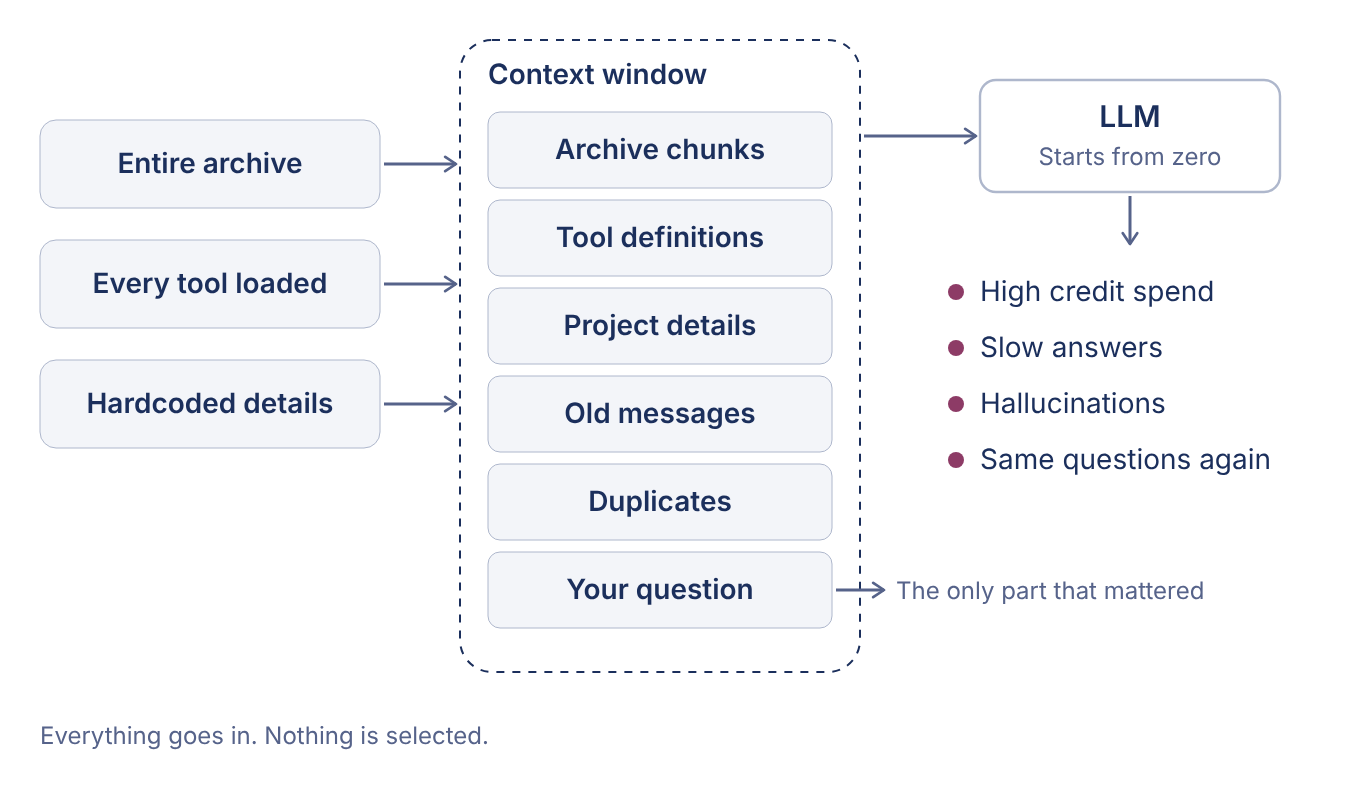
The result is predictable: high credit spend, slow answers, hallucinations when the model has to guess between conflicting material, and the same questions asked again because nothing was learned.
Practice 1: Keep the role separate from the context
An agent’s setup has two parts that are easy to blur: the role and the context. They are different things and belong in different places.
Role: who the agent is, what it can do, which tools it uses. This is paid for on every call, so keep it short and stable.
Context: what this particular project means: the customer, the history, what the folders contain. This is read selectively, when it is needed.
There are exceptions. An agent built for a single project can carry its details inside the role. A structured domain such as finance can be baked into a specialized agent. For general-purpose agents, mixing the two means paying for project details on every call, including calls that don’t need them, and editing the agent every time a project changes.
Practice 2: Write a context brief for every project
Give each project one short file that explains what it is about. A good brief covers:
who the customer or stakeholders are and what has happened so far;
what each folder and file group means;
where to find the latest information;
where deadlines and tasks live;
what the project’s terms mean (see Practice 5).
The brief holds pointers, not copies. Deadlines change, so the brief says where to look and the agent finds the current answer when asked, using semantic search. This is different from classic “chunk everything” retrieval. The agent reads the brief first, then goes to the specific files it points to, instead of searching the whole archive on every request.
Practice 3: Keep the brief current
A brief that goes stale is worse than none. Treat it as a living document: create the document, and create an agent whose job is to keep it updated. There are three ways to do that, from cheap to expensive:
Knowledge Keeper: a dedicated agent updates the brief as work progresses, and a human validates the changes.
Dated file list: the brief keeps a dated list of files, so the agent can see what changed since the last update.
Brute-force recheck: re-read everything periodically. It works, and it is the most expensive option.
When sources conflict, the agent either decides using clear rules or asks a human. Keeping a person in that loop keeps the context trustworthy.
Practice 4: Group and focus the context
Two moves decide how much lands in the window: grouping and focusing.
Group: give each large project, customer or function its own brief, files and agents, so a request about one never has to wade through unrelated material.
Focus: put only what the request needs in front of the model. Read the brief first, then the specific files it points to. The same idea is behind lazy-loading of tools over MCP: instead of putting thousands of tool definitions in front of the model, load only the ones required for the task.
Every slab you leave out of the window is spend you save and room you leave for the real question. A smaller scope also means fewer chances of the model mixing up two projects.
Practice 5: Define your terms, per project
Agents have to know what words like “customer”, “order” or “approved” mean, and the honest answer is often: it depends. Different customers and projects use the same word differently. In a telecom project, an “order” may be a service order moving through provisioning. In a retail project, it is a purchase with a delivery date.
Write the definitions in the project’s brief, next to the things they describe, rather than in one global glossary. The agent reads them together with the rest of the brief and does not have to guess. Where two projects use a term differently, each brief says so.
What GlobalContext builds in
With the principles above in place, this is how the process should work. A request goes to an agent. The agent assembles the window from its role, the brief of the relevant context and the key files found through semantic search, and nothing else. The Knowledge Keeper keeps that brief current in the background, and a human validates the changes. Only this lean window goes to the model: the filled part is optimized credit spend, and the free space is saved.
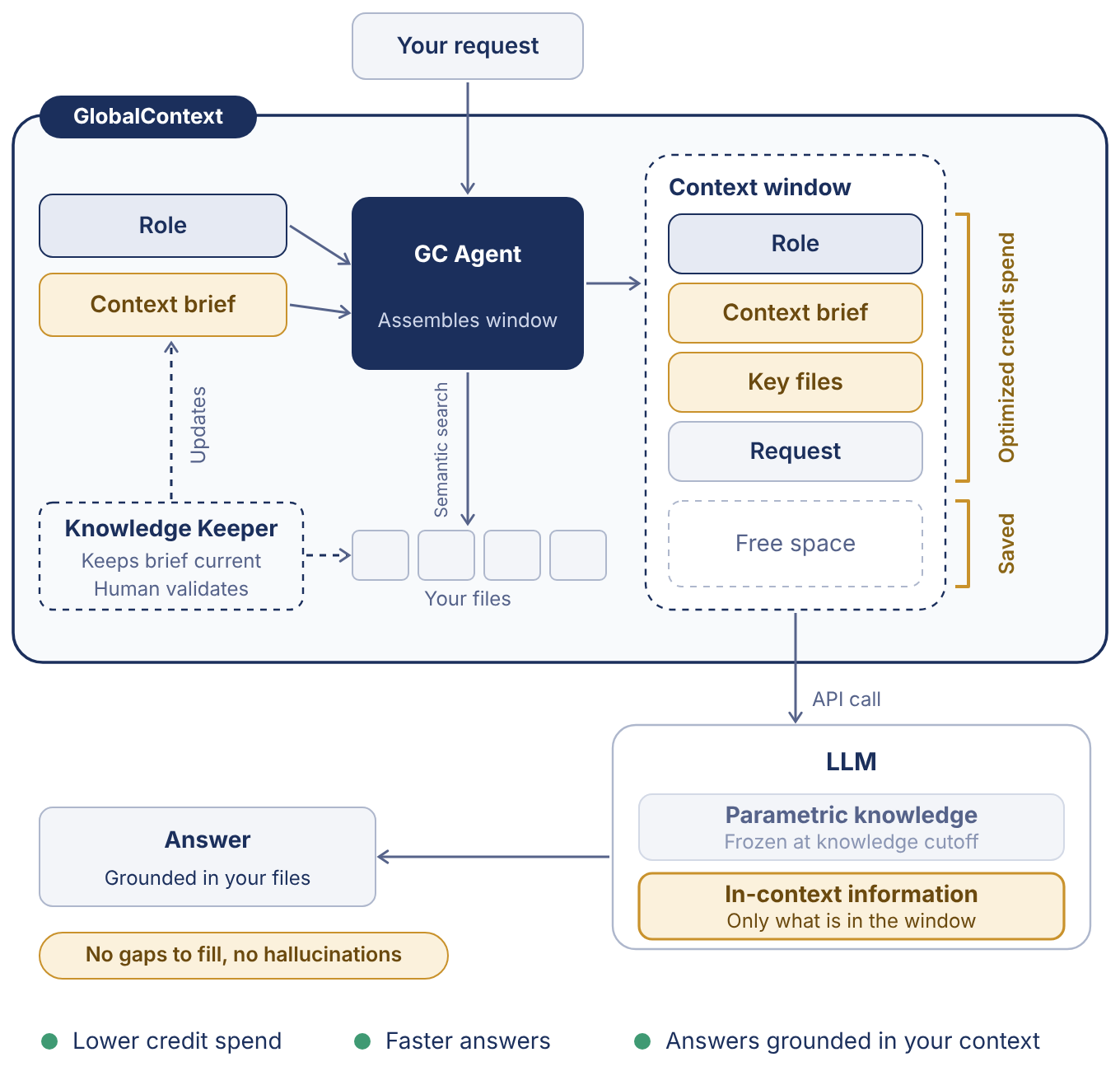
You should not need to engineer all of this from scratch. This is the setup and the tools GlobalContext provides:
Spaces: bound where people and agents work. Each space has its own context brief, files and agents.
Context briefs: created in conversation by the setup agents, with folder meanings and project terms written into them.
Knowledge Keeper: a dedicated agent keeps the brief current, and a human validates the changes.
Archetype agents: Expert, Coordinator, Assistant, Records Clerk, Analyst, Customer Rep and Knowledge Keeper, each with a lean role that stays separate from project context.
Lists: structured records that carry business meaning and rules, so agents work from the same data definitions.
Agent messages and approvals: an agent reaches out to you directly when something needs to change, when it has a question, or when an action needs your approval, so people stay in control of consequential actions.
Takeaways
Credit spend is a design decision. Separate role from context, write a brief for each project, keep it current, group and focus the context, and define terms where they apply. Do that, and you pay for what matters.
There is a second reason to care. A model has two kinds of knowledge. Parametric knowledge is what it learned in training, frozen at its knowledge cutoff. In-context information is what you put in the window. When the window lacks what the answer needs, the model fills the gap from its training, and a plausible but unsupported answer is a hallucination. When the window holds the right, current material, the answer is grounded in your context. A lean, well-framed window should mean fewer credits per request, faster answers and answers you can trust to reflect your own files.